Financial Rows - Page Header Variables
Getting Started
Displaying page headers enables you to show your Company Name the Report Type, and the Reporting Period.
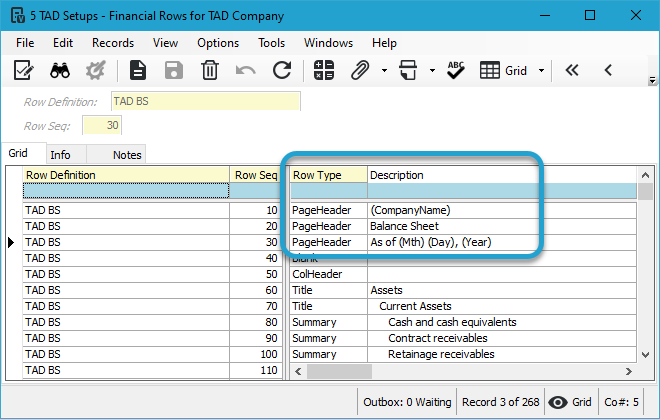
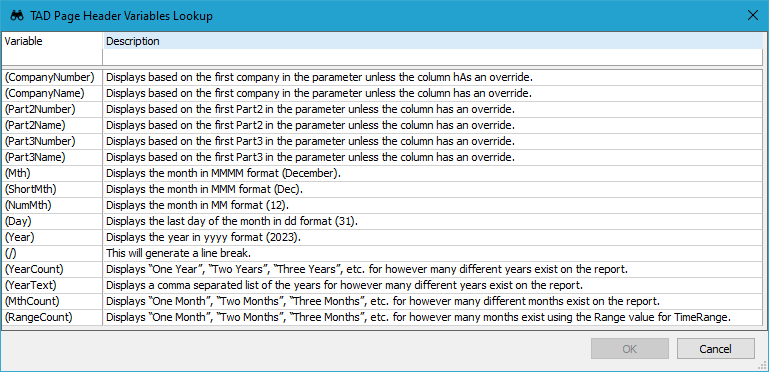
Pressing F4 in the Description field will open the lookup shown below.
Variables
When creating Financial Rows with the PageHeader Row Type, you can include the following variables in the Description column.
-
(CompanyNumber)
- Displays based on the first company in the parameter unless the column has an override.
-
(CompanyName)
- Displays based on the first company in the parameter unless the column has an override.
-
(Part2Number)
- Displays based on the first Part2 in the parameter unless the column has an override.
-
(Part2Name)
- Displays based on the first Part2 in the parameter unless the column has an override.
-
(Part3Number)
- Displays based on the first Part3 in the parameter unless the column has an override.
-
(Part3Name)
- Displays based on the first Part3 in the parameter unless the column has an override.
-
(Mth)
- Displays the month in MMMM format (December).
-
(ShortMth)
- Displays the month in MMM format (Dec).
-
(NumMth)
- Displays the month in MM format (12).
-
(Day)
- Displays the last day of the month in dd format (31).
-
(Year)
- Displays the year in yyyy format (2023).
-
(/)
- This will generate a line break.
-
(YearCount)
- Displays “One Year”, “Two Years”, “Three Years”, etc. for however many different years exist on the report.
-
(YearText)
- Displays a comma separated list of the years for however many different years exist on the report.
-
(MthCount)
- Displays “One Month”, “Two Months”, “Three Months”, etc. for however many different months exist on the report.
-
(RangeCount)
- Displays "One Month", "Two Months", "Three Months", etc. for however many months exist using the Range value for TimeRange.